Safety doesn’t start with equipment—it starts with conversation. And few tools spark that critical dialogue as effectively as a well-structured toolbox talk. Yet, too many teams still rely on inconsistent notes, verbal-only briefings, or recycled PDFs that fail to capture real hazards. The solution? A reliable, customizable toolbox talk blank template—one that supports fast, compliant, and meaningful safety discussions every single time.
This isn’t about filling out forms. It’s about creating a repeatable process that ensures key risks are communicated, understood, and documented—no matter the job site, crew size, or trade involved. Below, we break down what makes a blank template effective, how to deploy it, and include a ready-to-use structure you can adapt today.
Why a Blank Template Beats Ad-Hoc Safety Talks
Spontaneous safety conversations have value, but they’re unreliable. Without structure, critical details get missed. A blank template standardizes the essentials while leaving room for relevance. Think of it like a checklist: it doesn’t dictate your message—it ensures you don’t forget to deliver it.
Common gaps in informal talks: - No record of who attended - Unclear assignment of follow-up actions - Missing hazard specifics (e.g., location, mitigation steps) - No sign-off or accountability
A blank template closes these gaps. More importantly, it shifts safety talks from “something we do” to “something that matters.”
Essential Elements of an Effective Toolbox Talk Blank Template
Not all templates are created equal. A strong blank version includes core sections that promote clarity, engagement, and traceability. Here’s what to include:
#### 1. Talk Header (Basic Info) - Date and time - Location or work area - Topic/title of discussion - Facilitator name and role - Project or job site name
This sets context. Without it, future audits or incident investigations lack background.
#### 2. Safety Topic & Objective Clearly state the focus: Example: “Safe Use of Ladders on Uneven Ground” Follow with a one-sentence goal: “Ensure all team members understand how to inspect, position, and climb extension ladders safely on sloped terrain.”
This sharpens the message and keeps the talk focused.
#### 3. Hazard Identification List 2–4 specific hazards related to the topic. Use plain language. Example for ladder use: - Slipping due to muddy or loose footing - Overreaching while on ladder - Using damaged or unstable ladders - Lack of three-point contact
Avoid vague terms like “unsafe conditions.” Be specific and observable.
#### 4. Controls & Best Practices Match each hazard with a clear action. Example: - Inspect ladder feet and rungs before each use - Set up on firm, level ground or use ladder levelers - Maintain three-point contact at all times - Keep tools in a tool belt—not in hands
These should be actionable steps, not general advice.
#### 5. Discussion Prompts Include 2–3 open-ended questions to engage workers: - “Has anyone here encountered a ladder slip? What happened?” - “What’s one thing you’ll do differently after today’s talk?” - “Where on this site are ladders most at risk of instability?”
Engagement increases retention. These prompts turn passive listeners into active participants.
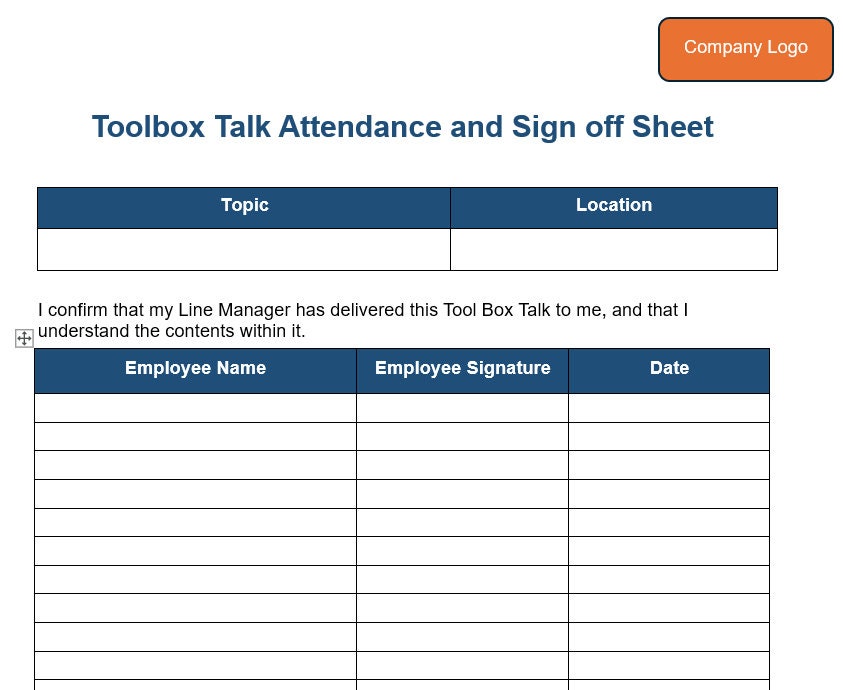
#### 6. Attendance & Sign-Off A simple table with: - Name - Signature - Date
This confirms attendance and understanding. Digital signatures are acceptable if your system supports them.
#### 7. Follow-Up Actions Space to record: - Corrective actions needed - Person responsible - Due date
Even small fixes—like replacing a worn ladder rung—should be tracked.
Real-World Example: Using the Template On-Site
Let’s say you’re starting a roofing job. Weather has been wet, and scaffolding access is on muddy ground. You pull out your blank toolbox talk template and fill in:
- Topic: Working Safely on Slippery Surfaces
- Hazard: Slips on wet decking, loss of balance during material carry
- Controls: Wear slip-resistant boots, clear debris, use handrails, carry one item at a time
- Prompt: “What’s the most dangerous slip hazard you’ve seen this week?”
You run the talk in 8 minutes. Ten workers sign in. One notes a missing handrail—logged under follow-up. The form is filed digitally and referenced during the weekly safety review.
Next week, the same template is used for “PPE Inspection,” showing how one document scales across topics.
When a Blank Template Falls Short (And How to Fix It)
Blank templates save time—but they’re not foolproof. Watch for these pitfalls:
#### ❌ Over-reliance on the form Using the same template for every topic without tailoring content leads to “check-the-box” behavior. Fix: Require facilitators to customize hazards and controls for each job phase.
#### ❌ Poor readability Tiny fonts, cluttered layout, or lack of space for signatures frustrate users. Fix: Design for usability—large writing areas, clear headings, mobile-friendly formatting.
#### ❌ No follow-through on actions Documenting a hazard means nothing if it’s not resolved. Fix: Assign a safety lead to review completed talks weekly and track open items.
A template is only as good as the process behind it.
5 Top Tools to Create and Manage Toolbox Talk Templates
While you can build a blank template in Word or Google Docs, digital tools offer greater efficiency, especially for multi-site operations. Here are five proven platforms:
| Tool | Key Features | Best For |
|---|---|---|
| SafetyCulture (iAuditor) | Pre-built templates, photo uploads, real-time reporting, offline use | Teams needing mobile-first workflows |
| SiteDocs | Custom form builder, automatic PDF generation, audit trail | Heavy industrial or construction firms |
| Procore (Safety Module) | Integrated with project management, supports digital sign-off | General contractors using Procore |
| ClickUp | Custom forms, task assignments, document storage | Small teams already using ClickUp |
| Microsoft Word + SharePoint | Free, fully customizable, easy to brand | Budget-conscious teams with simple needs |
Choose based on your workflow. If you’re paper-based now, start with Word. If you’re scaling, invest in a platform like SafetyCulture.
How to Customize Your Blank Template for Different Trades
A one-size-fits-all template often fails because it ignores trade-specific risks. Here’s how to adapt:

#### Electrical Crews Focus on: Lockout/tagout, PPE for arc flash, voltage testing procedures Add: Equipment model numbers, voltage levels on site
#### Welding Teams Highlight: Fire watch protocols, ventilation needs, cylinder storage Include: Permit-to-work references
#### Excavation & Trenching Emphasize: Soil type, shoring requirements, emergency rescue Add: Depth of cut, nearby utilities
Customization boosts relevance. A framer won’t care about arc flash—but they need fall protection reminders.
Integrating the Template into Daily Workflow
A blank template should fit into existing routines, not disrupt them. Try this:
- Schedule talks at shift start or crew huddle (5–10 minutes max)
- Assign weekly facilitators—rotate among supervisors or lead workers
- Store completed forms in a central folder (cloud or physical)
- Review monthly during safety meetings to spot trends
- Archive for at least 12 months for compliance (OSHA, COR, or client audits)
Make it routine, not a burden.
Final Version: Your Ready-to-Use Blank Template
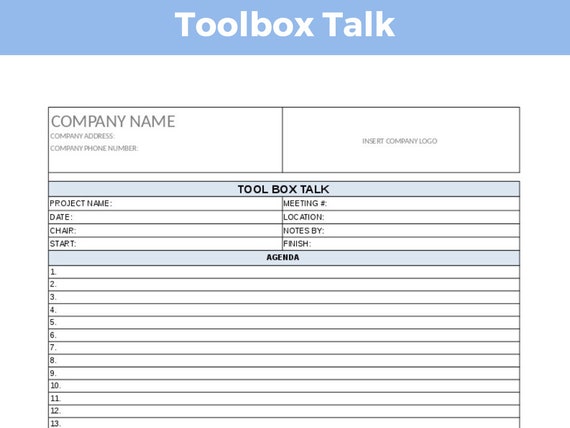
Below is a streamlined toolkit talk blank template you can copy and adapt:
Toolbox Talk Record Date: _______________ Time: _______________ Location: ___________________________________ Topic: ______________________________________ Facilitator: _________________________________ Project: ____________________________________
Objective: Briefly state the goal of this talk (1 sentence):
Hazards Identified: - [ ] ___________________________________________ - [ ] ___________________________________________ - [ ] ___________________________________________
Controls & Best Practices: - [ ] ___________________________________________ - [ ] ___________________________________________ - [ ] ___________________________________________
- Discussion Questions:
- _____________________________________________
- _____________________________________________
| Follow-Up Actions: | |||
|---|---|---|---|
| --------------- | ------------ | --------- | -------- |
| Attendance: | ||
|---|---|---|
| ------ | ----------- | ------ |
Make Safety Conversations Stick
A blank toolbox talk template is more than paperwork—it’s a framework for better communication, accountability, and risk awareness. Whether you’re managing a crew of three or thirty, the right template keeps safety visible, consistent, and actionable.
Start simple. Customize for your team. Use it every day. Over time, those short conversations compound into a stronger safety culture—where every worker knows the hazards, the rules, and their role in staying safe.
Download, print, or digitize the template above. Use it tomorrow. Refine it next week. Make it part of how you work—not just how you check boxes.
FAQ
What is a toolbox talk blank template used for? It’s a structured form used to document daily safety discussions, ensuring key hazards, controls, attendance, and follow-ups are consistently recorded.
Can I use a digital version of a blank template? Yes. Digital templates in apps like SafetyCulture or Procore improve accessibility, searchability, and compliance tracking.
How long should a toolbox talk last? Ideally 5 to 10 minutes. Focus on one relevant topic and encourage worker input.
Who should lead a toolbox talk? Supervisors, safety officers, or trained lead workers. Rotating facilitators can increase engagement.
Do all workers need to sign the template? Yes. Signatures confirm attendance and understanding, which is critical for legal and audit purposes.
How often should toolbox talks be held? Daily or at the start of each shift, especially when hazards change or new crews arrive.
Can the same template be used for all job types? The structure can stay the same, but content must be tailored to the specific job, crew, and hazards present.
FAQ
What should you look for in Toolbox Talk Blank Template for Safer Worksite Communication? Focus on relevance, practical value, and how well the solution matches real user intent.
Is Toolbox Talk Blank Template for Safer Worksite Communication suitable for beginners? That depends on the workflow, but a clear step-by-step approach usually makes it easier to start.
How do you compare options around Toolbox Talk Blank Template for Safer Worksite Communication? Compare features, trust signals, limitations, pricing, and ease of implementation.
What mistakes should you avoid? Avoid generic choices, weak validation, and decisions based only on marketing claims.
What is the next best step? Shortlist the most relevant options, validate them quickly, and refine from real-world results.