Workers assume equipment is safe when maintenance ends. But without a verified process, restarting machinery can be deadly. The lockout tagout sign out sheet closes that gap. It’s not just paperwork—it’s a real-time communication tool that confirms machines are de-energized, serviced, and cleared for operation. When used correctly, it prevents accidental startups, protects teams, and strengthens compliance with OSHA 1910.147.
Yet too many facilities misuse or overlook this document. Some rely on verbal handoffs. Others use incomplete forms missing key roles or timestamps. These shortcuts create blind spots where hazards linger. A robust sign out sheet turns assumptions into accountability.
This guide breaks down how to build, deploy, and audit an effective LOTO sign out system—without overcomplicating your workflow.
Why the Sign Out Sheet Is Non-Negotiable
Lockout tagout isn’t complete when maintenance ends. It ends when the equipment is safe to return to service. That transition is where the sign out sheet proves essential.
Consider a real-world scenario: A mechanic finishes replacing a motor on a conveyor system. They remove their lock, assuming the job is over. But a second technician is still adjusting sensors nearby. Without a formal sign out, the lead technician hits the start button—triggering an energy release that injures the second worker.
This isn’t hypothetical. OSHA cites improper energy control during re-energization as a recurring factor in industrial accidents.
The sign out sheet forces verification: - All tasks are complete - Tools are removed - Workers are clear - Only authorized personnel restore power
It creates a paper trail that protects individuals and the organization. In audits or incidents, that record becomes evidence of due diligence.
What Belongs on a Lockout Tagout Sign Out Sheet
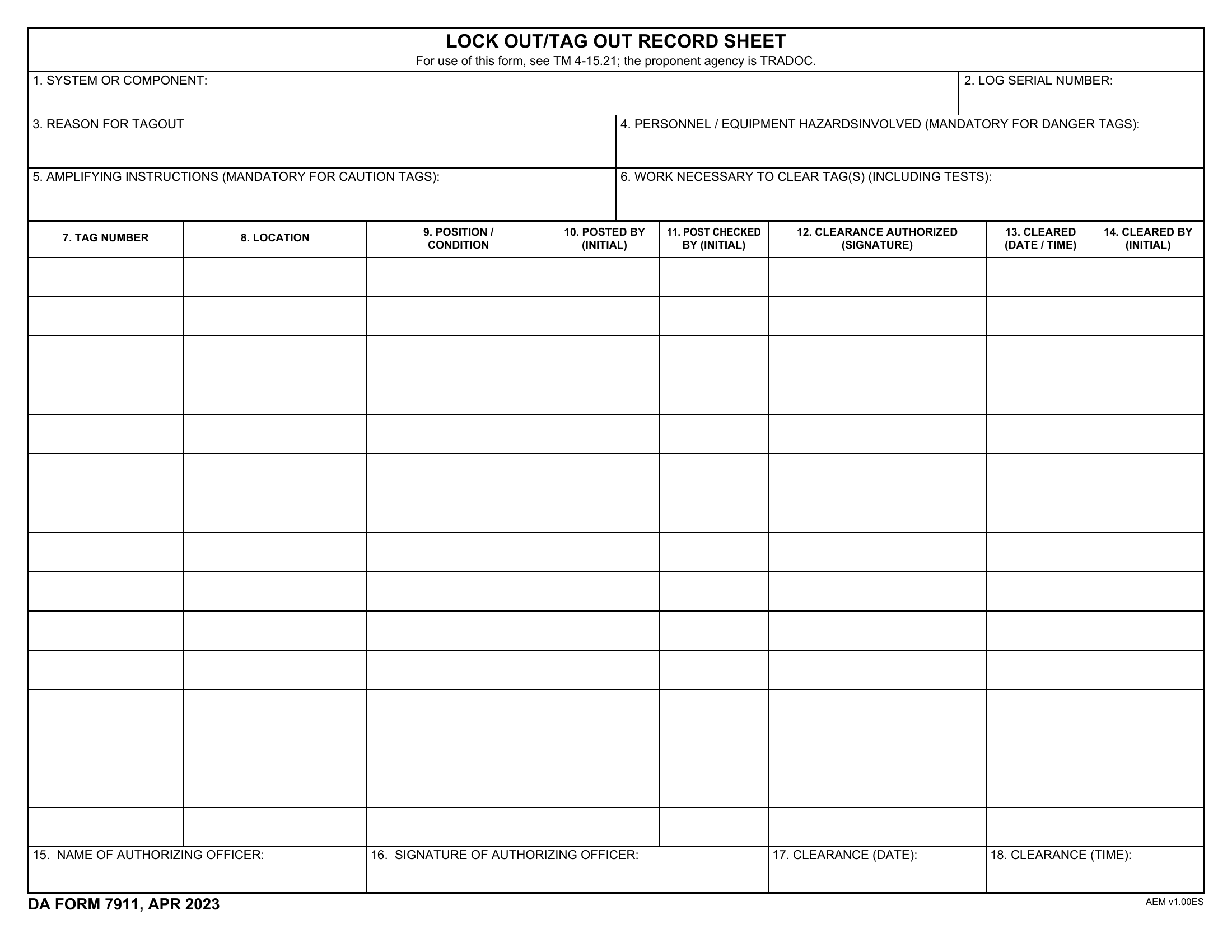
A strong form balances clarity with compliance. Too many fields slow adoption. Too few create risk. The following elements should always be present:
Required Fields
| Field | Purpose |
|---|---|
| Equipment ID | Prevents confusion across similar machines |
| Date and Time | Tracks lifecycle of the LOTO event |
| Authorized Employee Name | Assigns responsibility for the sign out |
| Verification Checklist | Confirms all parts are serviced and safe |
| Clearance Statement | Explicit confirmation that all workers are clear |
| Signature Line | Legal affirmation of completion |
Optional but recommended: - Shift number (for multi-shift environments) - Supervisor approval field - Notes section for exceptions or delays
Avoid vague phrases like “work completed” without detail. Replace with specific actions: “Motor coupling replaced,” “Guard reinstalled and secured.”
How the Sign Out Process Fits Into the Full LOTO Cycle
LOTO isn’t a single step—it’s a sequence. The sign out sheet activates at the end, but its value depends on what came before.
Here’s the full workflow with the sign out sheet’s role:

- Preparation – Identify energy sources, notify affected staff
- Shutdown – Stop equipment using normal controls
- Isolation – Disconnect energy via locks and valves
- Application of Locks/Tags – Each worker applies their device
- Release of Stored Energy – Bleed pressure, discharge capacitors
- Verification of Isolation – Confirm zero energy state
- Maintenance/Service – Perform the work
- Sign Out and Clearance – Use sign out sheet to confirm completion
- Removal of Locks/Tags – Only by the individual who applied them
- Re-energization – Restore power and return to operation
The sign out sheet anchors steps 8 and 9. It ensures no lock is removed prematurely and that all conditions for restart are met.
Example: In a paper mill, a maintenance team services a roller drive. After repairs, the lead technician fills out the sign out sheet, walks the area to confirm no one is near the roller, and signs. The supervisor reviews and initials. Only then can individual workers remove their locks.
Without this structure, someone might remove their lock early, assuming others are done—creating a gap in protection.
Common Mistakes That Undermine Sign Out Sheets
Even facilities with forms in place often fall into traps that reduce effectiveness.
1. Using the Same Person for Lock On and Sign Out
When the technician who applied the lock also signs it out without independent verification, it defeats the purpose. Peer or supervisor validation adds a critical layer of oversight.
2. Backdating or Pre-Filling Forms Sign out sheets filled in before work completes are dangerous and violate OSHA. Timestamps must reflect actual events.
3. Lack of Accessibility Storing sheets on a distant clipboard or in a locked office prevents real-time updates. Place them at or near the lockout station for immediate access.
4. Ignoring Group Lockout Nuances In group lockouts, multiple employees work on one machine. The sign out sheet must list each worker, their task, and their clearance status. A single signature isn’t enough.
5. No Integration with Digital Systems Paper-only processes delay communication. If a shift change occurs, the incoming team may not see the updated status. Digital logs with alerts solve this.
Fixing these issues starts with training—but also with designing forms that guide correct behavior.
5 Templates and Tools for Effective Sign Out Sheets
Not all sign out sheets are created equal. The best ones are clear, enforce accountability, and fit into existing safety systems. Here are five proven options:
1. OSHA-Compliant PDF Template (Free)
- Best for: Small to mid-sized operations on a budget
- Pros: Fully compliant, easy to print, field-tested
- Cons: Manual tracking, no alerts
- Use case: A family-owned machine shop uses this for routine maintenance on CNC lathes.
2. Industrial Safety Software (e.g., IndustrySafe)
- Best for: Large facilities with digital workflows
- Pros: Real-time updates, audit trails, mobile access
- Cons: Monthly cost, setup time
- Use case: An automotive plant syncs LOTO events across shifts using tablet-based forms.
3. Custom Whiteboard System
- Best for: High-visibility environments like power plants
- Pros: Instantly readable, supports team coordination
- Cons: Not permanent, prone to erasure
- Use case: A water treatment facility uses magnetic tags and a dry-erase board to track lock status and sign out progress.
4. Microsoft Power Apps Custom Form
- Best for: Companies using Microsoft 365
- Pros: Integrates with Teams and SharePoint, customizable
- Cons: Requires internal IT support
- Use case: A pharmaceutical manufacturer tracks LOTO events with automated approvals and email notifications.
5. laminated Clipboard Kit

- Best for: Mobile crews or remote sites
- Pros: Durable, low-tech, always available
- Cons: No digital backup
- Use case: HVAC technicians use weather-resistant kits with carbon-copy sheets for job site sign outs.
Choose based on your team size, tech maturity, and risk level. High-risk environments benefit from digital tracking. Simpler operations may thrive with paper.
Real-World Example: How a Food Processing Plant Avoided Disaster
At a frozen food facility, a technician began re-energizing a packaging line after a jam. He checked his lockout sheet—only his lock was applied. He assumed it was safe.
But a second worker had been called in to inspect a servo motor. They hadn’t signed in because “it was just a quick check.” No sign out sheet existed for them. When power restored, the motor engaged, pulling the technician’s sleeve into the drive.
Investigation revealed no central sign out process. The facility switched to a mandatory digital log. Now, every lock application triggers a sign out form. No re-energization occurs without a completed, supervisor-reviewed sheet.
Within six months, near-miss reports dropped by 70%. The sign out sheet became the final checkpoint—simple, enforceable, and life-saving.
How to Audit Your Sign Out Sheet System
A form that sits unused is worse than no form at all—it creates false confidence. Audit your process quarterly using these criteria:
- Completeness: Are all fields filled every time?
- Accuracy: Do timestamps match work logs?
- Accessibility: Can authorized personnel access the sheet during shifts?
- Retention: Are copies stored for at least one year?
- Training: Can employees explain the sign out process without prompts?
During one audit, a chemical plant found 40% of sign out sheets were missing supervisor initials. Root cause: supervisors were off-site during weekend shifts. The fix? Designated acting supervisors with clear authority and training.
Audits shouldn’t punish—they should refine. Use findings to simplify forms, clarify roles, and reinforce culture.
Building a Culture Where Sign Out Sheets Are Respected
The best form fails without buy-in. Workers skip steps when they feel bureaucracy outweighs benefit.
Combat this by: - Involving frontline staff in form design - Sharing incident near-misses (anonymized) - Recognizing teams that follow protocol perfectly - Linking LOTO compliance to safety incentives
One refinery runs a “Zero Gap” campaign, spotlighting flawless lockout-tagout cycles each month. The sign out sheet is a centerpiece. Teams post photos of completed forms on a safety board. It’s peer recognition—not punishment—that drives change.
Final Step: Make It Real, Make It Routine
A lockout tagout sign out sheet only works when it’s part of daily rhythm. Choose a format that fits your operation, train relentlessly, and audit consistently. Don’t treat it as compliance paperwork. Treat it as the last line of defense between a machine at rest and a team at risk.
Start tomorrow: Pull your current form. Walk through a real maintenance scenario. Ask: - Does it capture all necessary details? - Can someone unfamiliar with the job understand it? - Is it used every single time?
If not, revise. Print. Train. Repeat. Safety isn’t in the policy manual. It’s in the sheet clipped to the lockout station—filled out, signed, and respected.
FAQ
What should you look for in Lockout Tagout Sign Out Sheet Best Practices? Focus on relevance, practical value, and how well the solution matches real user intent.
Is Lockout Tagout Sign Out Sheet Best Practices suitable for beginners? That depends on the workflow, but a clear step-by-step approach usually makes it easier to start.
How do you compare options around Lockout Tagout Sign Out Sheet Best Practices? Compare features, trust signals, limitations, pricing, and ease of implementation.
What mistakes should you avoid? Avoid generic choices, weak validation, and decisions based only on marketing claims.
What is the next best step? Shortlist the most relevant options, validate them quickly, and refine from real-world results.